
In today’s digital world more and more people from different countries are finding their way to our websites. This global audience presents a vast opportunity for businesses to expand their reach and connect with diverse demographics. However, with this opportunity comes the challenge of catering to users who speak different languages and reside in various regions.
Simply using translate widgets like Google Translate isn’t enough to reach a global audience. These widgets often generate dynamic translations without creating unique URLs for each language version, hindering indexing and visibility by search engines.
To effectively localize and increase visibility, creating unique pages with separate URLs for each language version is crucial. Implementing hreflang tags is essential for optimal SEO performance and user experience on multilingual websites.
What are Hreflang Tags?
Hreflang tags, short for “hypertext reference language” tags, are HTML attributes used to indicate the language and regional targeting of web pages. These tags are primarily employed in multilingual websites to help search engines understand which language versions of a page should be served to users based on their language and location preferences. Hreflang tags are inserted in the <head> section of a webpage’s HTML code and consist of a combination of language codes and optional region codes. They specify the relationship between different language versions of a page, allowing search engines to properly index and rank them in relevant search results for users searching in different languages or regions. By implementing hreflang tags, website owners can improve the visibility and accessibility of their content to international audiences, thereby enhancing the overall user experience and optimizing search engine performance across diverse linguistic markets.
Why Hreflang Tags are Essential for SEO of Multilingual Websites
Hreflang tags are integral for the effective search engine optimization (SEO) of multilingual websites. In today’s competitive online landscape, achieving high visibility in search engine results is paramount for attracting organic traffic and reaching target audiences effectively. With the global nature of the internet, catering to users in different linguistic and geographical regions requires precise targeting of content. Hreflang tags provide search engines with clear signals about the language and regional targeting of web pages, enabling them to serve the most relevant content to users based on their language preferences and location. By incorporating hreflang tags into the HTML code of multilingual websites, website owners can enhance their SEO efforts by ensuring that each language version of their content is properly indexed and ranked in search results for the corresponding audience. This not only improves the overall visibility and accessibility of the website but also enhances the user experience by delivering content in the user’s preferred language and region. Therefore, for multilingual websites aiming to maximize their SEO performance and effectively reach global audiences, the implementation of hreflang tags is essential.
Utilizing Google Apps Script to Analyse Hreflang Tags
Google Apps Script is a cloud-based scripting language developed by Google that allows users to automate tasks, extend functionality, and integrate with various Google products and services In our case we will integrate it with Google Sheets to generate a hreflang tag report.
I will guide you through creating a simple system to generate a map of your hreflang tags. By developing this tool, you can easily visualize which pages of your website contain which hreflang tags and to which URLs these hreflang tags direct. In this way it will enable you to effectively manage and optimize your website’s language targeting strategy, ensuring better user experience and search engine performance.
Setting up Google Sheets and Apps Scripts
To create a spreadsheet in Google Sheets, you can follow these steps:
- Open Google Sheets:
- Open your web browser and sing in to Google if you have not already
- By entering “https://sheets.new/” you can easily create a spreadsheet.
- Add URLs to Column A
- Row A1 should be named as URLs
- You should add the URLs for which you want to scan the hreflang tags to the rest of the Column A
- Activate Apps Script
- Click Extensions and then choose App Script
- A new tab will be opened and you can give a name to your project.
- Add a Script
- Adding a script is straightforward task. Simply click on the ‘+’ symbol located in the Files tab, select ‘Script,’ and proceed to provide a name for your script. In this case you may write Hreflang Checker. Copy and paste the code below and save:
function detectHreflangTags() {
  var sheet = SpreadsheetApp.getActiveSpreadsheet().getActiveSheet();
  var data = sheet.getRange("A2:A" + sheet.getLastRow()).getValues();
  var urls = data.map(function(row) {
    return row[0];
  });

  var hreflangCodes = {};

  urls.forEach(function(url, index) {
    try {
      var response = UrlFetchApp.fetch(url);
      var responseCode = response.getResponseCode();
      if (responseCode >= 400) {
        console.error("Error fetching URL:", url, "HTTP status code:", responseCode);
        markRowAsError(sheet, index + 2); // Adjusted index to account for 1-based indexing and skipping header row
        return; // Skip URLs with error status codes
      }
      var content = response.getContentText();
      var hreflangTags = content.match(/<link\s+rel="alternate"\s+href="([^"]+)"\s+hreflang="([^"]+)"\s*\/?>/gi);

      if (hreflangTags) {
        hreflangTags.forEach(function(tag) {
          var match = tag.match(/<link\s+rel="alternate"\s+href="([^"]+)"\s+hreflang="([^"]+)"\s*\/?>/i);
          var href = match[1];
          var hreflang = match[2].replace(/-/g, '_');

          if (!hreflangCodes[hreflang]) {
            hreflangCodes[hreflang] = {};
          }
          hreflangCodes[hreflang][url] = href;
        });
      }
    } catch (error) {
      console.error("Error fetching URL:", url, error);
      markRowAsError(sheet, index + 2); // Adjusted index to account for 1-based indexing and skipping header row
    }
  });

  // Write hreflang codes to header row
  var headerRow = sheet.getRange(1, 2, 1, Object.keys(hreflangCodes).length).setValues([Object.keys(hreflangCodes)]);

  // Write hreflang links
  var row = 2;
  urls.forEach(function(url) {
    var rowData = [];
    for (var hreflang in hreflangCodes) {
      rowData.push(hreflangCodes[hreflang][url] || "");
    }
    sheet.getRange(row, 2, 1, rowData.length).setValues([rowData]);
    row++;
  });
}

function markRowAsError(sheet, rowIndex) {
  var range = sheet.getRange(rowIndex, 1, 1, sheet.getLastColumn());
  range.setBackground("red");
}
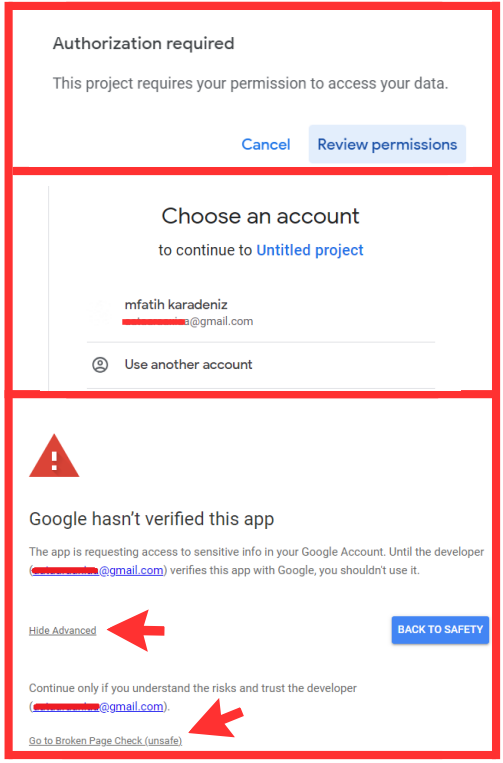
Giving Access to Google Sheets
After adding this code you should run the code. It will ask you to authorize Google Apps Script to make changes into your Google Sheet. You should give access by following steps presented in the image above and run the code.
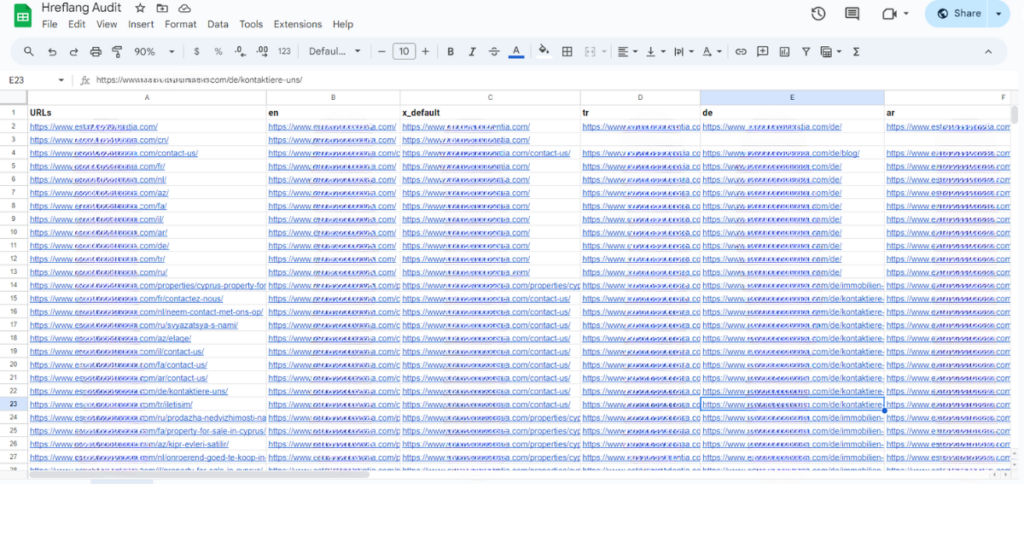
After you run the code this is approximately how your Sheet will look like. In this way you will be able to see each of the hreflang tags and related URLs within the URLs of the Column A.
In addition, you should note that this code will skip those URLs in the column A if they are broken pages
Limitations of Google Apps Script
Despite being a cost-free cloud-based scripting language with complimentary web-app service, Google Apps Script has certain constraints worth noting. One significant limitation is the time restriction on the execution of these scripts, capped at 6 minutes. If the execution exceeds this timeframe due to factors such as the quantity of URLs or other complexities, the code will not complete.
Conclusion
The following result after running the code will display the language codes of the detected hreflang tags mapped out in the Google Sheets document. The header rows will represent the language codes, and their corresponding URLs will be listed under them. Each column corresponds to a specific language or regional variant, while each row represents a URL from your website. The cells will contain the hreflang URLs found in the corresponding webpage’s HTML code.
This layout allows for a clear visualization of how hreflang tags are implemented across different language versions of your website. By reviewing this data, you can ensure that each page is correctly linked to its corresponding language or regional variant, thereby optimizing your website’s targeting for international audiences.
By regularly analyzing and updating this hreflang tag map, you can maintain a well-structured and optimized multilingual website, ultimately improving its search engine visibility and user experience for global visitors.


Yapısal Veri Test Aracı
